I'm a product designer who turns complex ideas into intuitive, engaging digital experiences. I combine UX thinking, visual design, prototyping, and creative technology to make products that are both useful and memorable.
I bring together product thinking, UX strategy, interaction design, and visual design to create intuitive digital experiences. My background in front-end development and illustration gives me a strong understanding of how both products are built and how they communicate.
Product Design
Designing usable, scalable product experiences across complex workflows.
UX Strategy
Turning ambiguity into clear structure, direction, and product thinking.
Visual Design
Crafting expressive interfaces with strong hierarchy and personality.
Creative Technology
Using code and emerging tools to push ideas beyond static design.
latest work.
A look at what I’m currently designing, prototyping, and building.
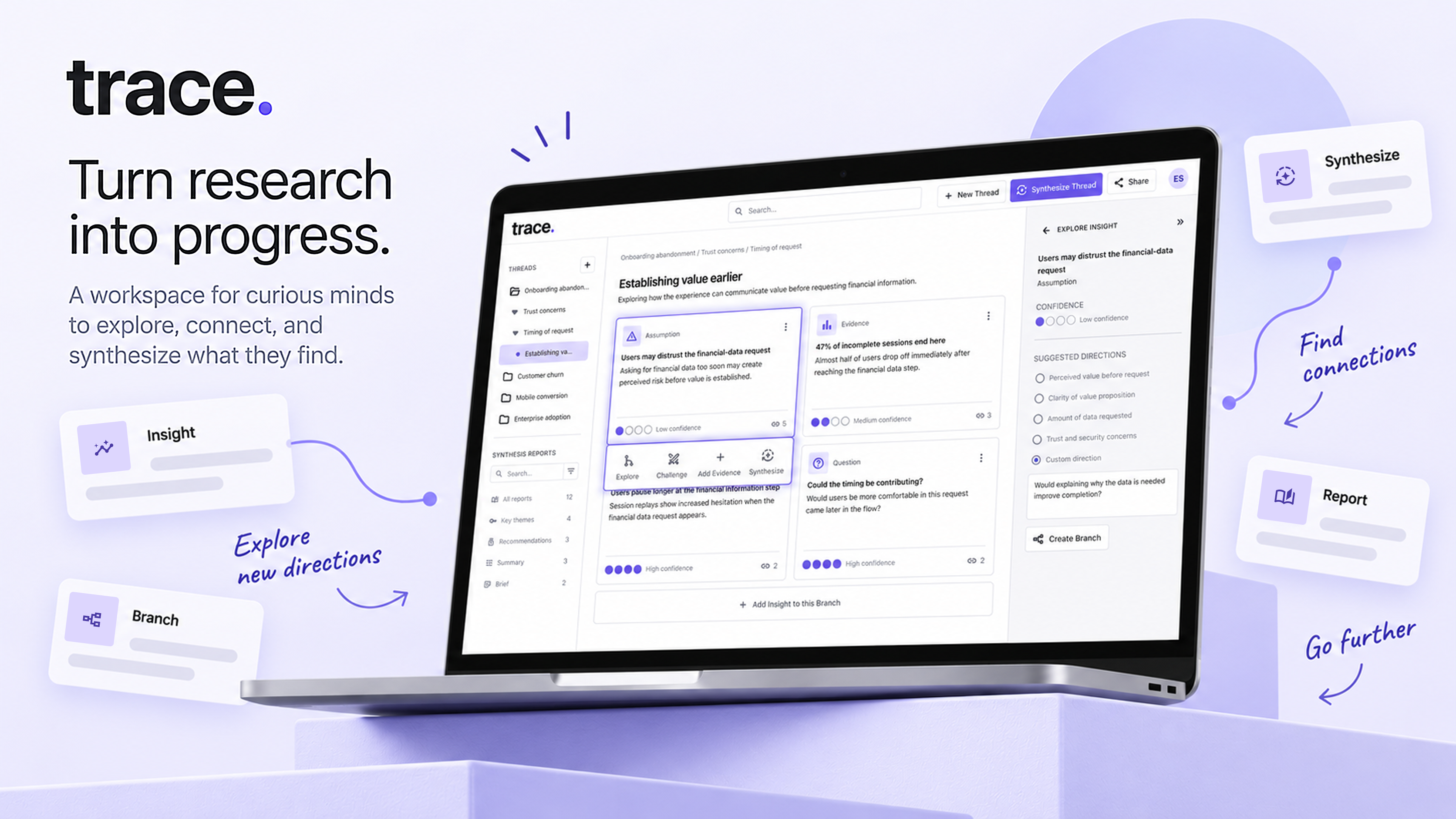
trace case study.
Turning scattered research into structured insights, connected branches, and actionable synthesis.
trace — case study.
Turn scattered research into structured understanding.
Research rarely moves in a straight line. Trace is an AI-powered workspace built for the moments when one question turns into five more.
It gives researchers a place to follow those branches without losing the thread, keeping evidence, context, and emerging ideas connected as the work evolves. When it’s time to make sense of everything, Trace helps bring those pieces back together into a clearer point of view.
One question leads to another. A piece of evidence opens up a new direction. An assumption that seemed solid at first suddenly needs another look.
That’s where research starts to get messy.
As the work expands, it becomes harder to keep track of how everything connects. Questions get separated from the evidence that prompted them. New ideas branch off. Conclusions lose some of the reasoning that made them useful in the first place.
Trace began with a simple question: what would a research workspace look like if it were designed around that messiness instead of forcing everything into a linear process?
The goal was to let researchers follow new directions while keeping the path, and the thinking behind it, intact.
02 — The design challenge.
How might we help researchers explore complex, branching questions without losing the relationships between what they discover?
The challenge wasn’t simply giving people more ways to organize research. It was figuring out how to support exploration as it naturally unfolds, with questions leading to evidence, evidence challenging assumptions, and new directions emerging along the way.
The workspace needed to make those relationships visible without turning into a maze. Researchers should be able to move deeper into an idea, step back out, and still understand where they are, what they’ve learned, and how they got there.
03 — Trace's product model.
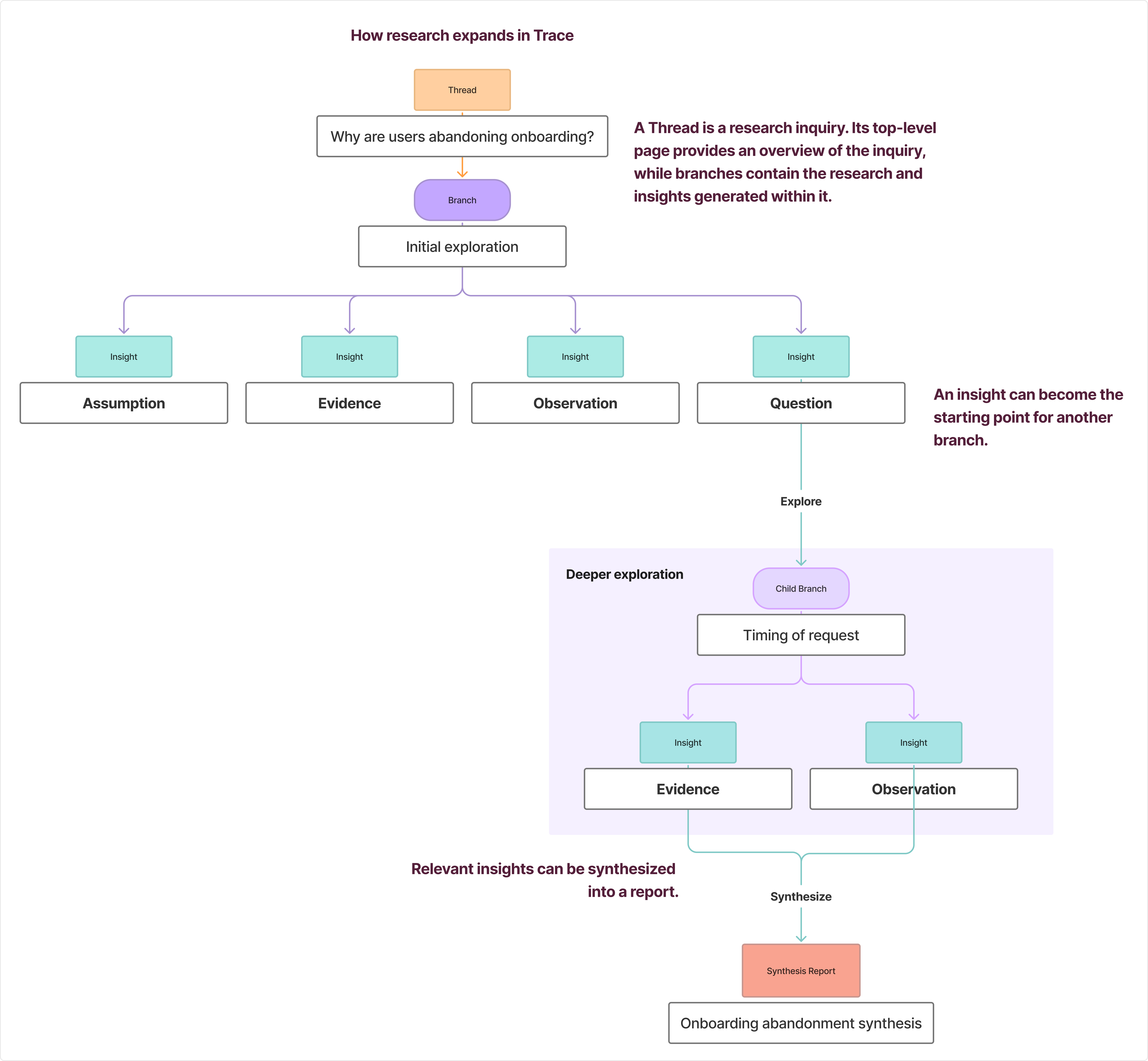
To give all of that complexity some structure, I built Trace around four connected layers: Threads, Branches, Insights, and Synthesis.
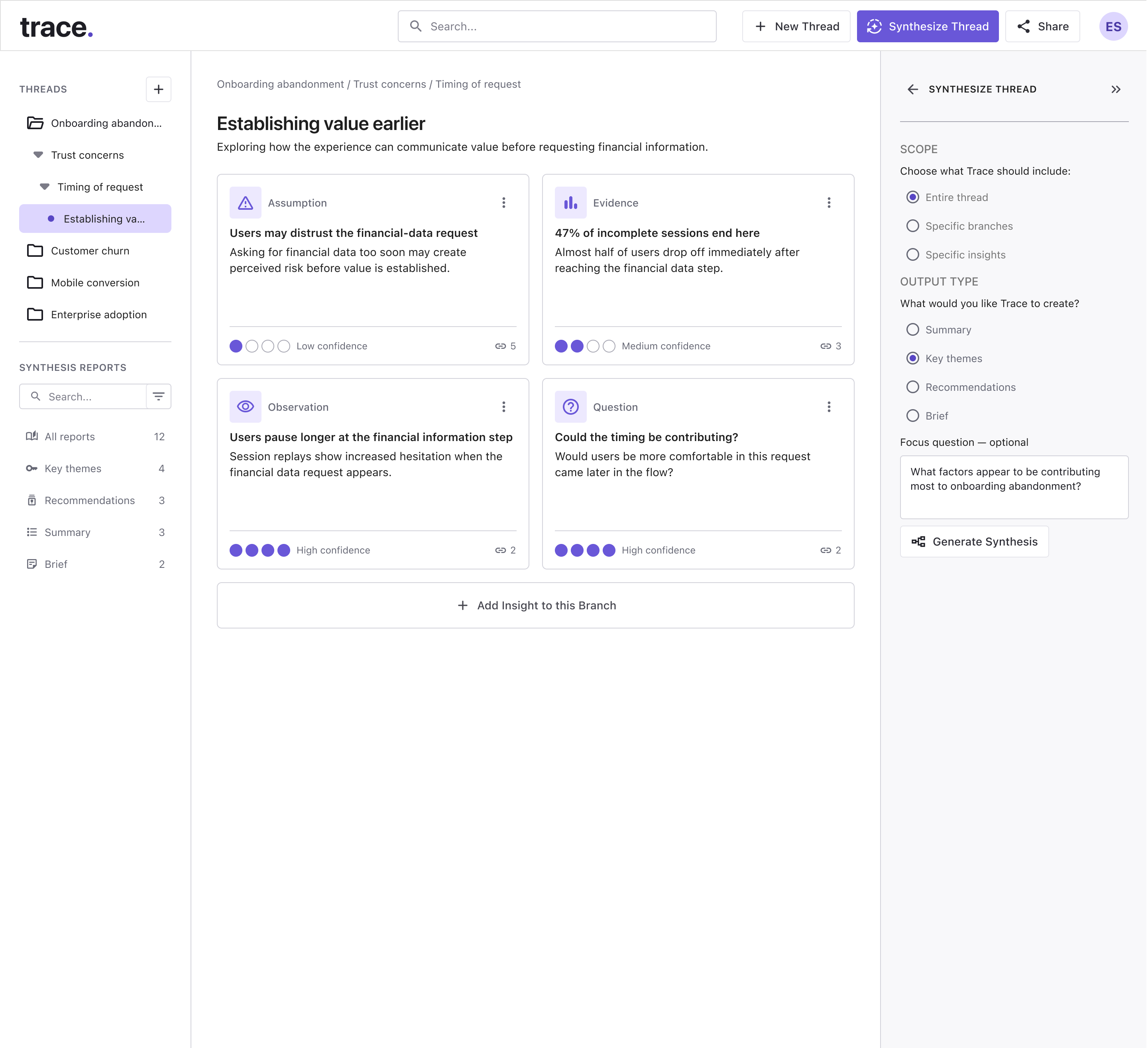
A Thread holds the larger question being explored. When the research starts pulling in a different direction, a Branch gives that idea room to develop without separating it from where it started.
As researchers move through those paths, they capture Insights: evidence, assumptions, observations, and open questions that shape what comes next. Synthesis brings those pieces back together, helping researchers step out of the details and see what the work is actually pointing toward.
Thread → Branches → Insights → Synthesis
04 — Designing for branching exploration.
Branching research can get complicated fast. I wanted Trace to preserve that depth without making researchers feel like they were navigating a giant decision tree.
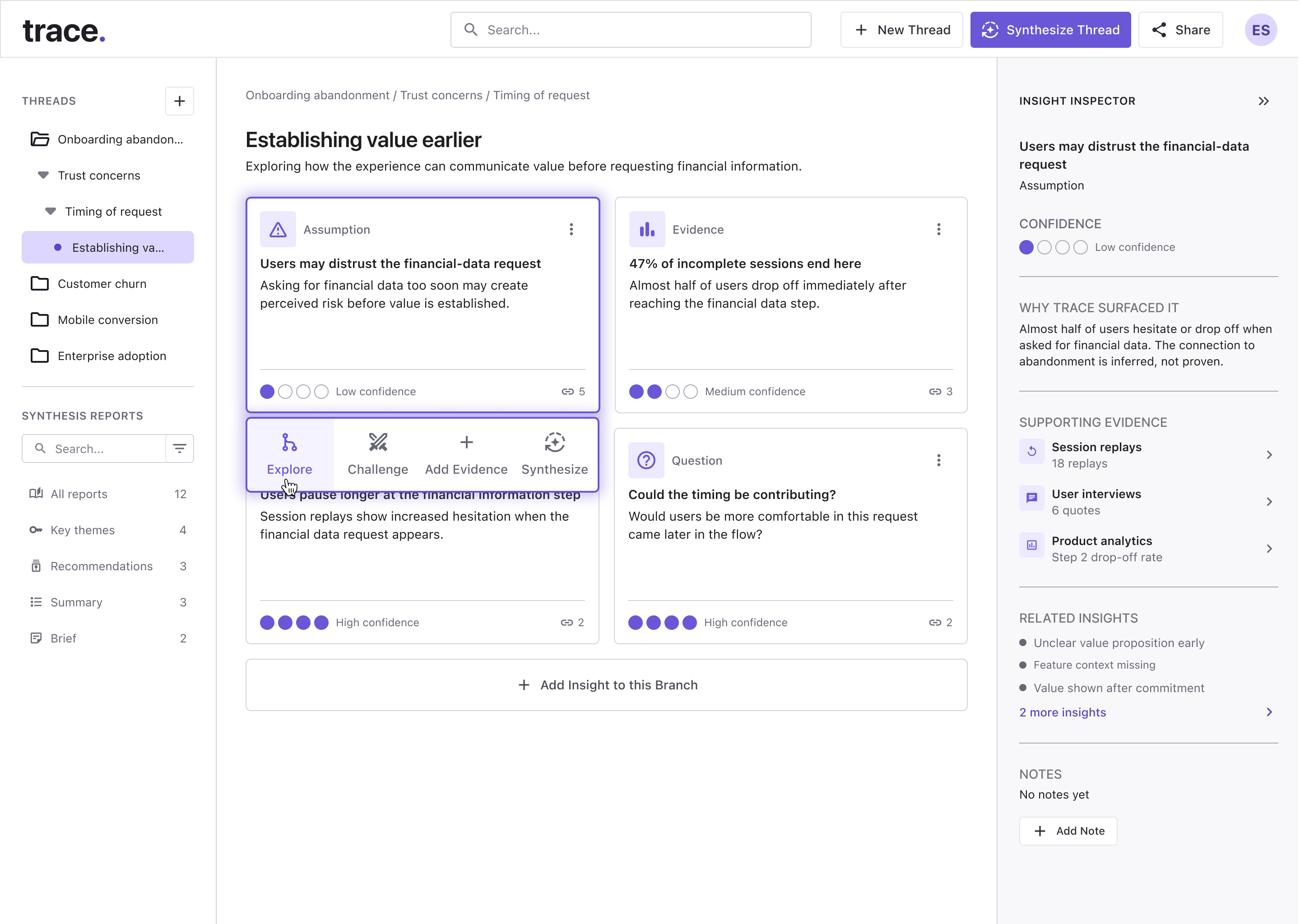
The branch hierarchy stays visible in the sidebar, while the main canvas narrows the experience to the line of inquiry someone is working through right now. That balance became important: keep the larger structure within reach, but don’t make people process all of it at once.
Insights work the same way. Selecting one brings its context and actions forward without pulling the researcher away from the surrounding work. From there, they can review supporting evidence, see related insights, challenge a finding, add new evidence, synthesize what they’ve learned, or turn the insight into the beginning of a new branch.
That last action is what keeps the model moving. A useful finding doesn’t have to be an endpoint. Sometimes it becomes the next question.
05 — Keeping research context visible.
The deeper someone moves into a research thread, the easier it is to forget how they got there.
I designed the sidebar to act as a constant point of orientation. It keeps the active hierarchy visible, so researchers can see the path from the larger thread down to the branch they’re currently exploring, while still being able to jump between related areas quickly.
Rather than showing the entire structure at once, the navigation reveals depth progressively. Clear selected and active states make it easier to understand what’s open, what’s being explored, and where the current branch sits within the larger investigation.
The goal was simple: researchers shouldn’t have to rebuild the map in their head every time they move somewhere new.
06 — Turning insights into synthesis.
At a certain point, collecting more information stops being the hard part. The harder question is: what does all of this actually mean?
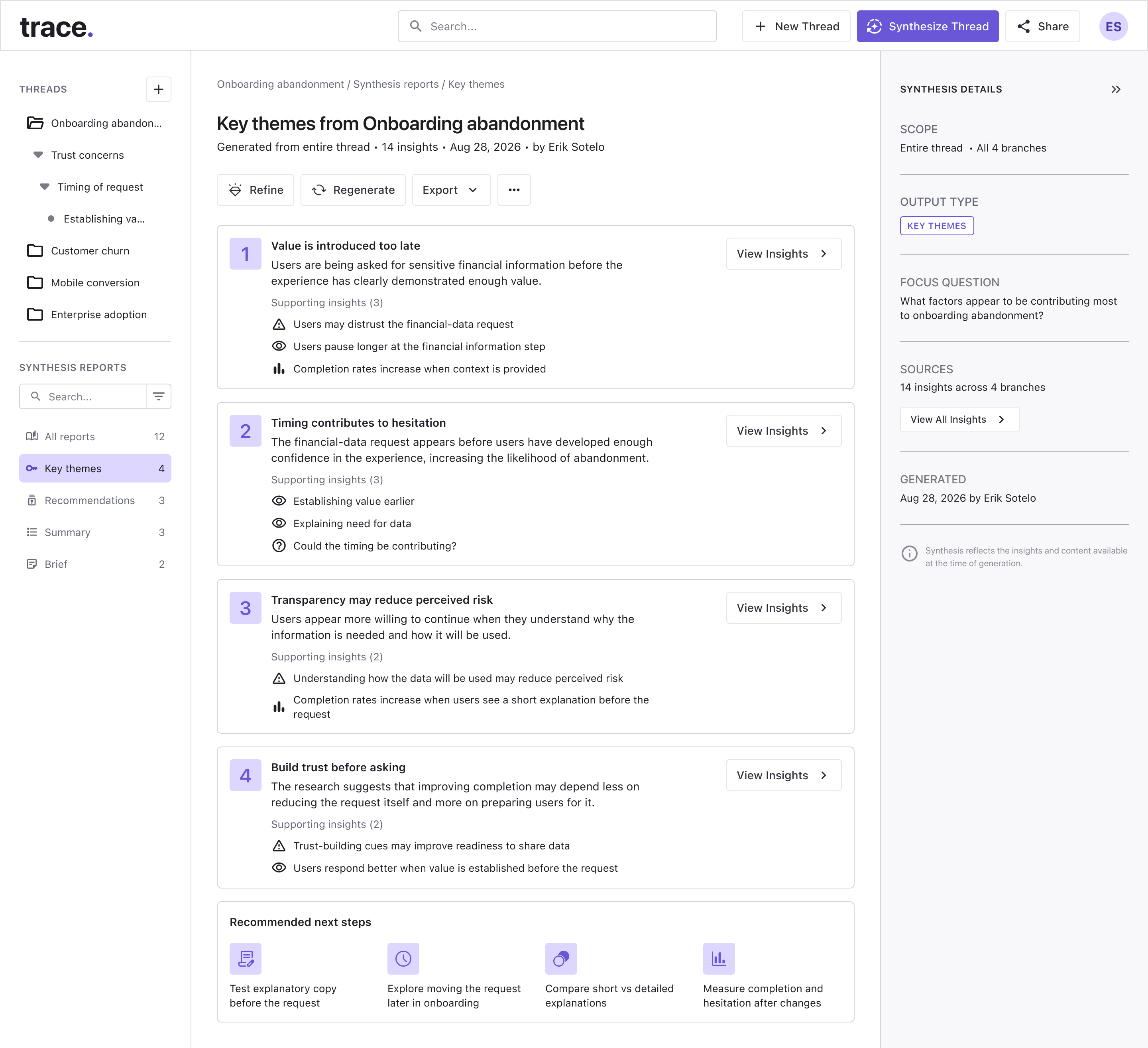
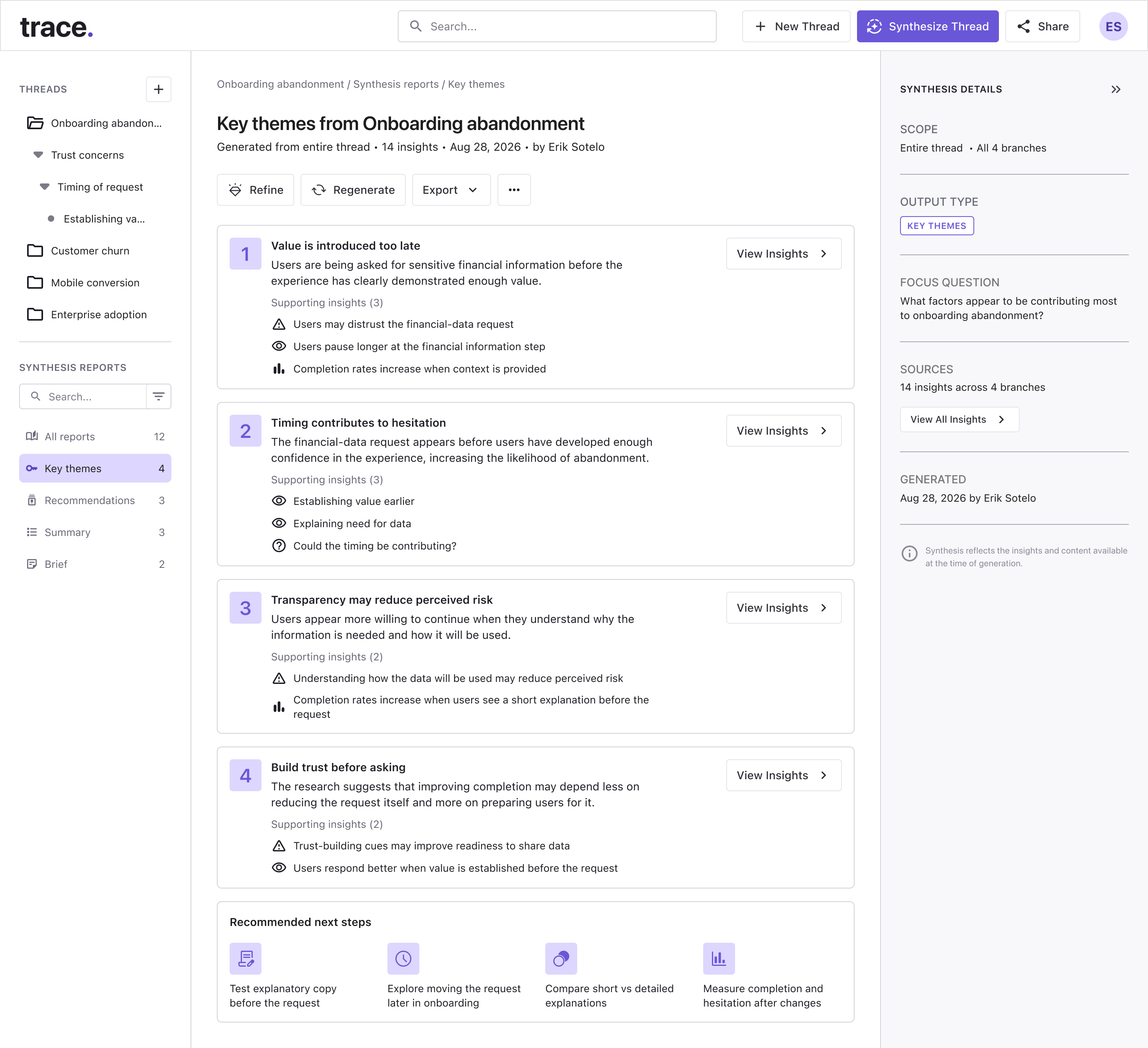
Trace lets researchers pull relevant insights from across their work into a synthesis flow, where they can organize patterns, findings, and next steps into a report.
I wanted that shift to feel natural, not like jumping into a separate tool or starting over from scratch. The context behind each insight stays connected as the research moves from exploration into interpretation.
That way, synthesis becomes part of the same workflow rather than something researchers have to reconstruct at the end.
07 — Designing the report experience.
A useful report can’t just spit back a summary. Researchers need to understand why a conclusion is there and what evidence supports it.
I structured the report around thematic findings, the insights behind them, and clear next steps. That gives researchers a quick way to scan the bigger picture while still being able to dig back into the source material when something needs a closer look.
From there, they can refine the report, regenerate parts of the synthesis, review supporting evidence, and decide what happens next.
The goal was to make the output feel traceable, not like a black box that suddenly hands over an answer, but as a continuation of the research that came before it.
08 — Reflection and next steps.
One of the biggest lessons from Trace came from building it, not just designing it.
Turning the screens into a working Claude prototype exposed interaction problems that were much harder to catch in Figma. The clearest one was navigation. The sidebar works well at the depth shown in this case study, but once the research tree grows beyond that, the structure starts to ask too much of the user.
That pushed me to rethink how deeper exploration should work. A future version would likely move toward a more focused subtree model, where researchers can step into a specific area without carrying the full hierarchy with them at all times.
If I continued developing Trace, I’d test that model with larger research trees and pay close attention to how much context people actually need to stay oriented. I’d also spend more time on the transition between broad exploration and focused work, since that is where the current navigation starts to show its limits.
Synthesis would be the other major area to validate. I’d want to test how researchers choose source insights, interpret AI-generated themes, and verify the evidence behind a report before using it to make decisions.
contact me.
Interested in working with me? I'd love to chat! Send me a message and I will get back to you ASAP. Alternatively, I can be reached on LinkedIn, or Dribbble! Links are in the footer below.